Use KaleidaGraph for Curve Fitting

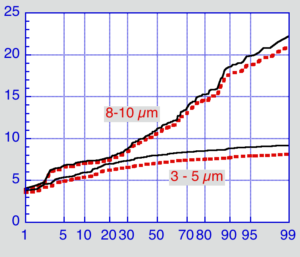
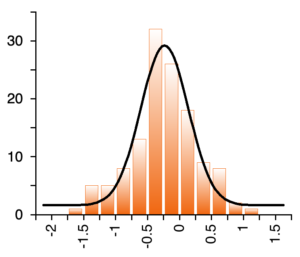
Plot with a dose response curve fit

Create production-quality, scientific graphs in minutes!

Transform your raw data into clear, compelling visuals. KaleidaGraph combines flexible plot types, 100+ built-in curve fit formulas, and robust statistical tools so you can analyze, explore, and present your findings with confidence.

Plus, with our perpetual licenses, there are no annual subscription fees. You pay once and only purchase upgrades if and when you choose to.

Try KaleidaGraph today!

Create your own plots using our FREE 30-day trial version.

Unlock the Full Power of Your Data with KaleidaGraph Curve Fitting

Curve fitting (regression analysis) reveals the hidden trends in your data points by generating the ideal line or curve. Whether you need a precise mathematical equation to predict values or a clean smooth fit to enhance your publication-ready plots, KaleidaGraph gives you complete control over both.

Powerful Nonlinear Curve Fitting

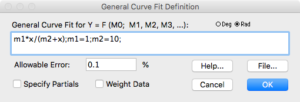
Take full control of your analysis with KaleidaGraph’s most versatile fitting tool. Select from over 100 pre-built library definitions or enter your own custom equations to fit complex data with absolute precision.

Dialog to enter user-defined curve fit equation

Fast, Reliable Least Squares Curve Fitting

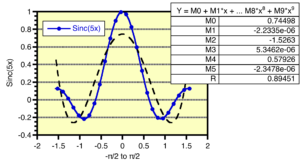
Least Squares remains the industry standard for fast, straightforward data fitting. KaleidaGraph makes it effortless with five built-in fit types: Linear, Polynomial, Exponential, Logarithmic, and Power.

Plot with a Polynomial curve fit

Visualize Trends Effortlessly with Smooth Fits

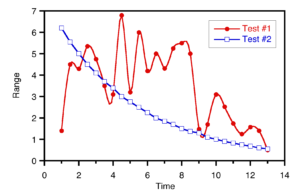
Not every dataset needs a complex formula. KaleidaGraph offers flexible smoothing algorithms designed to transform noisy or scattered data into clean, presentation-ready visualizations. KaleidaGraph includes four specialized smoothing fits: Smooth, Weighted, Cubic Spline, and Interpolate.

Plot with a Cubic Spline curve fit

Instantly Access and Export Curve Fit Data

Once you apply a nonlinear or Least Squares curve fit, KaleidaGraph gives you two flexible ways to analyze your parameter values: display the equation directly on your plot for clear reporting, or view detailed coefficients in a dialog ready for export and further analysis.

Table showing results of a Linear curve fit

Export Curve Fit Results in Seconds

Easily extract your statistical results without manual copy-pasting. KaleidaGraph lets you compile all nonlinear and Least Squares curve fit results from any plot directly into a new data window with a single click. Easily export curve fit coefficients, predicted values, and residuals for instant downstream analysis.

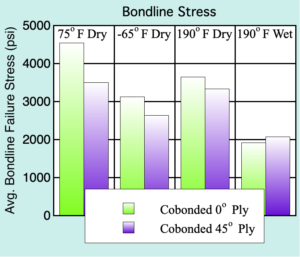
KaleidaGraph Graph Examples

Featuring over 25 different plot types. Mac and Windows data and plot files are fully interchangeable.

Meeting the needs of scientists and engineers for over 35 years.

See what one of our long-time customers has to say:

I started using KaleidaGraph about 30 years ago, as a much welcome upgrade to the venerable Cricket Graph, which I had used on an old MacPlus since 1986 - maybe started with KaleidaGraph when I got a Mac II with color monitor, although details not so clear as it was a long time ago. Since then I have introduced it to numerous PhD, Masters, and undergrad students, so have hopefully contributed somewhat to your growth. My first intervention was always to point out, when someone presented me with a horrible Excel 'chart', that it would really be much wiser to do such things with KaleidaGraph - nobody ever told me I was wrong about this! Best wishes for the future.

Michael Robert Carroll

Professor of Petrology, University of Camerino
Scroll to Top
Synergy Software
Privacy Overview

This website uses cookies so that we can provide you with the best user experience possible. Cookie information is stored in your browser and performs functions such as recognising you when you return to our website and helping our team to understand which sections of the website you find most interesting and useful.